




Integration

Fits into your system environment. Not the other way around.

Schedule an appointment
Trusted by leading companies Capterra 5 Sterne Bewertung
thyssenkrupp logo

Ready to go right away, even without ERP

SIMPL also works completely standalone—no ERP integration, no IT project, no waiting. Many customers get started exactly this way: upload machine data via Excel import, invite your team, and get started.

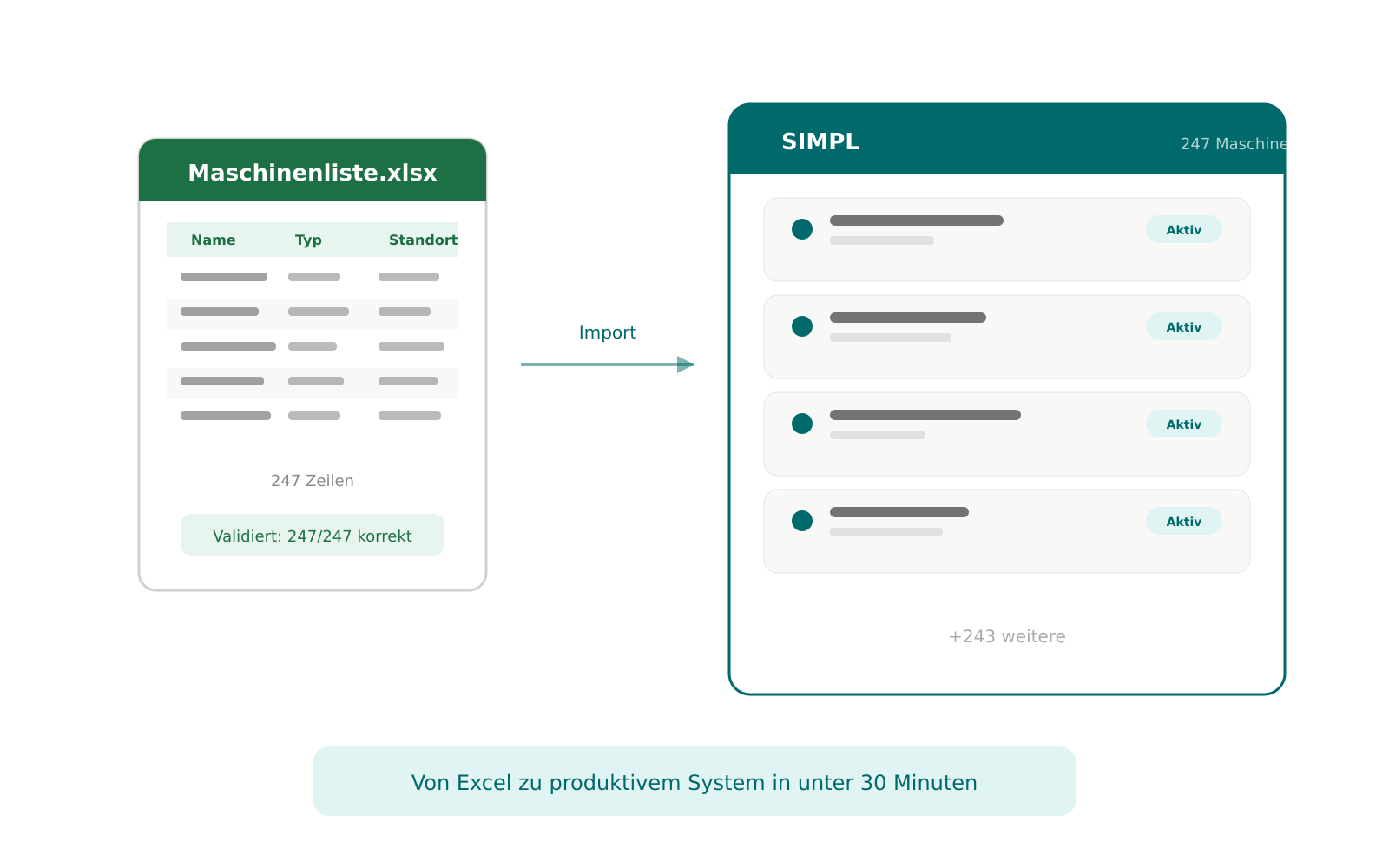
Excel import for a quick start Do you have your machines, customers, or orders in Excel spreadsheets? SIMPL imports them directly—map columns, validate, and you’re done. Within minutes, your data is in the system without anyone having to type a single thing.

Work first, integrate later The ERP connection can be set up at any time later on—when you’re ready. There’s no dependency: SIMPL delivers full functionality even without an interface to a third-party system. Many customers start standalone and connect their ERP only after a few weeks, once the processes are up and running.

No IT project required To get started with SIMPL, you don’t need an IT team, infrastructure, or a project plan. Open your browser, import your data, and get to work. Integration comes when it makes sense—not because it’s a prerequisite.
Why integration is still important

In most industrial companies, the ERP system manages master data: machines, customers, orders, and materials. At the same time, service teams need a solution that works on mobile devices, supports technicians in the field, and offers customers self-service options. The ERP system usually can’t do this—or can only do so with great difficulty.

The result: data is maintained in duplicate, information arrives late, and there’s a gap between the ERP and day-to-day service operations. Once SIMPL is integrated into your daily operations, the next logical step is to connect it to the ERP—so that data is maintained in just one place.

Your ERP remains the leading system. SIMPL becomes the smart, mobile front end for your service team.

Open REST API & Developer Portal

SIMPL takes an API-first approach. Every data point—whether customer data, machine data, orders, tickets, times, or documents—is available via a documented REST API. Bidirectional, in real time.
What this means for your IT:

Comprehensive developer portal Your IT team will find everything they need for integration: documented endpoints, data models, authentication, and sample workflows. No reverse engineering, no trial and error.

Bidirectional synchronization Data flows in both directions. When a new order is created in the ERP, it appears in SIMPL. When a technician enters a status update in SIMPL, it appears in the ERP. Automatically, without manual reconciliation.

Real-time or batch—you decide Depending on your requirements, SIMPL synchronizes in real time or at defined intervals. For master data, a daily sync is often sufficient. For orders and status updates, real-time synchronization is the standard.

Webhooks for event-driven processes SIMPL can automatically notify external systems upon certain events—new ticket, status change, completed job. No polling, no delay.

ERP systems used by SIMPL customers

SIMPL is already connected to a wide range of ERP systems in production:

SAP From SAP ECC to S/4HANA and Business One – SIMPL synchronizes master data, orders, confirmations, and materials in both directions. At thyssenkrupp Steel Europe, the SAP integration is live: order data is automatically transferred from SAP to SIMPL, eliminating the need for manual initial data entry entirely. → View the thyssenkrupp customer reference (/why-simpl/customer-references/thyssenkrupp/)

Microsoft Dynamics / Navision / Business Central Whether Dynamics 365, classic Navision, or Business Central—SIMPL connects via the standard APIs. Master data, order statuses, and times remain synchronized.

ProAlpha For medium-sized companies in the mechanical engineering sector, ProAlpha is one of the most widely used ERP systems. SIMPL integrates master data, orders, and confirmations via the ProAlpha API.

ABAS ABAS customers use SIMPL as a mobile service interface—with bidirectional synchronization of machines, orders, and material consumption.

Salesforce For companies using Salesforce as their CRM, SIMPL synchronizes customer data and service tickets bidirectionally—ensuring that sales and service teams work with the same information.

Microsoft 365 Emails are sent and received directly from SIMPL. AI writes, translates, and classifies—all within the MS365 integration.

Other Systems Thanks to its open REST API, SIMPL can essentially be connected to any system that provides an API. Whether it’s Infor, Sage, PSI Penta, or industry-specific solutions—as long as there’s an interface, the connection works.

What is typically synchronized

Master Data: Machines, Customers, Locations The ERP system remains the primary source for master data. SIMPL automatically imports this data and keeps it synchronized. New machines added to the ERP system appear immediately in SIMPL—without the need for manual entry.

Orders and Confirmations Orders from the ERP are created in SIMPL as tickets or assignments. Confirmations, times, and material consumption are automatically fed back into the ERP upon completion. No back-entry, no retyping.

Spare Parts and Materials Material inventories and spare part information from the ERP are available in SIMPL. Technicians can see on-site whether a part is in stock—and consumption is reported directly back to the ERP.

Times and Work Reports Work hours recorded in SIMPL are automatically transferred to the ERP or payroll system. No double entry, no paper slips.

Documents and Reports Service reports, checklists, and inspection logs from SIMPL can be automatically stored in the DMS or ERP—audit-proof and assigned to the correct machine.

Here's how integration works in practice

Step 1: Clarify requirements Together, we define which data should flow in which direction. Which system manages which data? Real-time or batch? Which fields will be mapped?

Step 2: Configure the connection Your IT department—or your ERP service provider—sets up the interface via the developer portal. For standard ERPs like SAP, Dynamics, or ProAlpha, there are pre-built connectors that significantly reduce the effort required.

Step 3: Test and go live The synchronization is tested with real data. Incorrect mappings or missing fields are corrected before the system goes live.

Step 4: Monitoring After go-live, SIMPL monitors the synchronization. Errors are logged and reported—so nothing gets lost.

Security during integration: All API connections are encrypted using TLS. Access is controlled and logged via token-based authentication. SIMPL does not store login credentials for external systems—authentication is handled using secure token-based methods.

→ Learn more: Made & Hosted in Germany

Close Menu